


YoLink
3.3308.00 Reviews
App Specs
- Version
- 1.53.2
- Updated On
- License
- Free
- Downloads
- 100,000+
- Developer
- Yosmart Inc.
- Categories
- House & Home
- Platform
- Android, iOS
Screenshots
 Analysis by AppCompare
My first impression of YoLink was that a smart-home app should make everyday tasks feel simpler, not give me another system to babysit. Its appeal is easy to understand during the first few days: devices appear together in one place, and a sensor or control can make a small household chore feel more manageable. The more useful question, though, is whether that convenience lasts once the novelty wears off. For me, the answer depends less on how many automations I can imagine and more on whether I choose a few that solve real, recurring problems.
The first-week appeal: one place to check the home
At the beginning, I would focus on a modest setup rather than trying to automate every room. A door sensor, a leak sensor, or a light control can each address a specific worry or routine. When I can open one app and see the status of the devices I care about, the value is immediate: I spend less time wondering whether something needs attention and more time getting on with the day. That is a better test of usefulness than building a complicated routine just because the option sounds clever.
A realistic example is leaving home in a hurry. Instead of walking back to check a door or a light, I can use the app to review the relevant device and decide whether anything needs attention. The benefit is not that an app eliminates every uncertainty; it is that it can give me a practical point of reference when I am away. I would start by choosing alerts that answer a clear question, such as whether a door has opened, rather than turning on every notification available.
The first week is also when it helps to think about the people who share the space. A setup that makes sense to the person who created it may not be obvious to everyone else. I would name devices in plain language and keep rooms or groups organized around how people actually talk about the home. That small bit of housekeeping can make a shared system easier to use than a collection of cryptic device labels.
Month-to-month value comes from habits, not novelty
Once the initial excitement fades, I judge a home-control app by whether I still open it for a reason. YoLink is more likely to earn a lasting place if it supports an ordinary habit: checking a sensor before bed, responding to a useful alert, or adjusting a control when plans change. If I only open it to admire a dashboard, its value will probably shrink. If it helps me make one repeated task easier, it has a stronger case for staying on my phone.
I would treat automation as a gradual process. First, learn how a device behaves when used manually. Then, if the action is predictable and genuinely repetitive, consider whether a schedule or routine would remove effort without creating confusion. This order matters: an automatic action that surprises someone in the household can be more irritating than the task it was meant to replace. A simple routine that everyone understands is usually more valuable than several clever ones that nobody remembers how to manage.
There is also a useful distinction between alerts that inform and alerts that demand attention. A notification about an event I care about can save me a trip or prompt a timely check. A stream of low-value updates trains me to ignore the phone, which weakens the alerts that matter. I would begin with a narrow set of notifications and widen it only when I know each one has a purpose. That is a practical way to preserve the app’s usefulness over time.
Worth Reading Before You Choose

EA SPORTS FC Mobile 26 Is a Bigger Football Game, but It Takes Time

Flipboard Shows What News Apps Must Do Beyond the Feed

Switching to Android Auto Means Rethinking Your Driving Routine

Google Calendar Makes a Crowded Week Easier to Manage

Ludo King Makes the Most of the Minutes Between Plans

Baby Panda World Brings Quick Play to Modern Phones, but Its Game Library Feels Busy
Maintenance is part of the smart-home routine
Smart-home convenience is never entirely hands-off. Devices need to remain connected, routines need to stay relevant, and household habits change. I would occasionally review the setup and ask whether each alert still matters, whether a schedule still matches the family’s day, and whether a device name remains clear. This is not a reason to avoid automation; it is simply the upkeep that keeps an automated system from becoming a source of odd behavior.
One non-obvious tip is to keep the first version of a routine easy to diagnose. If a light or another device behaves unexpectedly, a simple setup makes it easier to identify which condition or schedule is responsible. Adding several actions at once can make troubleshooting harder, especially when the routine was created months ago and its logic is no longer fresh in mind. I would make one change, observe how it fits into daily life, and only then build on it.
It is also worth deciding in advance what should happen when a notification arrives. If a door alert appears while I am out, for example, I need a sensible next step: check the situation, contact someone at home, or simply note the event. An alert without a response plan can create worry without improving safety. Thinking through that workflow before relying on a sensor helps keep the app in its proper role: a useful source of information, not a substitute for judgment or for checking a serious concern directly.
For anyone who shares a home, I would explain the basics before depending on a routine. Other household members should know what an alert means and which controls they can use. This prevents a common smart-home annoyance: one person builds a system that feels convenient to them while everyone else experiences unexplained notifications or changes. A little agreement makes a modest setup more durable than a technically ambitious one.
Where fatigue can set in
The main risk is not necessarily a dramatic failure; it is friction accumulating in small ways. If checking device status takes more effort than the task itself, I will stop checking. If a notification arrives at the wrong time or says something I already know, I will be tempted to dismiss it without reading. And if an automation does not match the household’s changing schedule, its presence can feel less like help and more like another thing to correct.
There is a trade-off between central control and simplicity. Keeping devices together can make the home easier to manage, but a single app does not automatically make every device or use case equally straightforward. I would avoid assuming that a dashboard alone is enough; the real test is whether the particular devices I own are supported and whether their controls meet my needs. Before building a setup around any smart-home app, I would check compatibility for the exact devices I intend to use.
I would also be cautious about treating a phone notification as a guarantee. For a serious household concern, an app alert is useful as one layer of awareness, but it should not replace appropriate precautions or a direct check when one is needed. That distinction matters most with security or safety-related devices: the convenience of remote visibility is valuable, but it should not encourage me to rely on a single app as the whole plan.
Who is likely to get the most from it?
I think the app is best suited to people who already have compatible smart-home devices, want a central place to manage them, and are willing to spend a little time keeping their setup understandable. It may be especially useful for someone who checks on a home while away, or who wants a sensor alert to reduce uncertainty about a particular room or entry point. Its appeal is practical rather than showy: the more clearly a device solves a recurring problem, the easier it is to justify keeping the app in regular use.
It is a less natural fit for someone who wants a smart home to run entirely without attention, or who has no interest in checking compatibility and maintaining routines. If a person owns only one device and its own app already handles that job cleanly, adding another layer may not improve the experience. Likewise, someone who prefers physical controls and rarely needs remote access may find that a central dashboard brings little everyday benefit. I would choose the simplest setup that handles the actual need, rather than adding connected devices for their own sake.
Compared with the usual alternatives in the smart-home category, the most important question is not which app has the busiest interface; it is whether the system works with the devices already in the home and makes their everyday controls easy to reach. A manufacturer-specific app can be a sensible choice when a household uses just one product family and wants only its basic controls. A broader home-control app is more appealing when there are several compatible devices to manage together. I would make that decision around the devices and routines I actually use, not around a promise that any one app will unify everything.
Living with YoLink beyond the setup phase
YoLink is a House & Home app from Yosmart Inc., and it is free to download. It has an average rating of 3.2 from around 500 ratings, with over 100,000 installs. It is rated for everyone, first appeared in June 2019, and its current version is 1.53.2, with Android 5.0 as the minimum operating-system requirement. Those details give a quick sense of the app’s reach, but they do not settle the personal question that matters more: whether it fits the devices and habits in my home.
My practical approach would be to begin with one clear use case, learn how the relevant device behaves, and keep only the alerts and automation that continue to help. That makes it easier to notice whether the system is genuinely saving time or merely moving small chores onto a screen. It also makes the setup easier to explain to other people in the household, which is an important part of long-term usefulness that can be overlooked during the initial setup.
So, I recently got my hands on this app called YoLink, and I have to say, it’s quite the nifty little thing. If you’re into smart home devices and automation, this app might just be your new best friend. Let me take you through my experience with it, and hopefully, you’ll get a feel for whether it’s worth a download.
Getting Started with YoLink
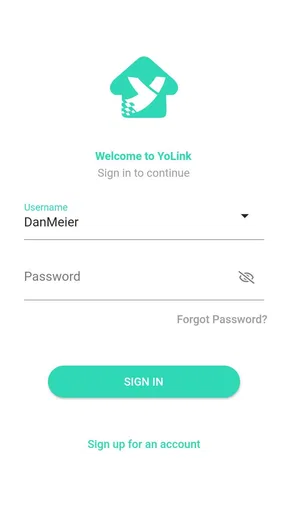
First off, the installation process was a breeze. I hate it when apps make you jump through hoops just to get started, but YoLink was refreshingly straightforward. Once you download it, it guides you through setting up your account and connecting your devices. I had my smart bulbs and sensors linked in no time.
Interface and Usability
The app’s interface is super user-friendly. It doesn’t overwhelm you with options, but it gives you just enough control to feel like you’re the boss of your smart home. Everything is laid out in a clean, intuitive manner, which I appreciated. Even my tech-challenged aunt could navigate through it with minimal fuss.
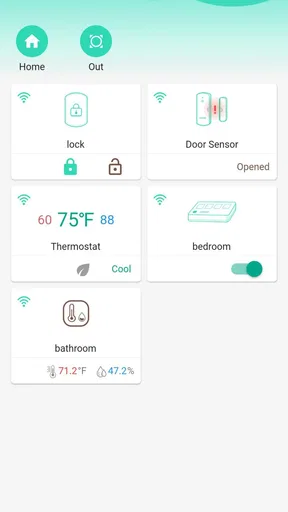
One thing that stood out was the dashboard. It’s like having a control center for your entire house right in your pocket. You can see all your connected devices, check their status, and even control them remotely. It’s perfect for those of us who like to keep an eye on things, even when we're away from home.
Features and Functionality
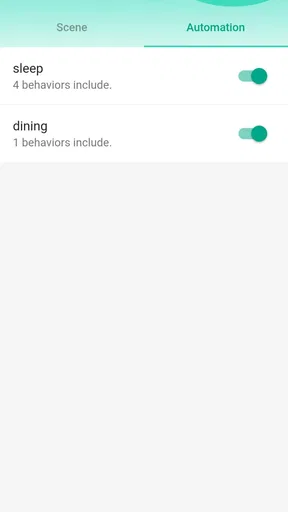
Now, let’s talk about what this app can actually do. YoLink supports a wide range of devices, from smart lights to thermostats and security cameras. The automation options are pretty cool too. You can set up routines and schedules, so things happen automatically without you having to lift a finger. Imagine having your lights dimmed and your thermostat adjusted just the way you like it, right when you get home from work.
Another feature I found pretty handy was the alert system. If any of your devices detect something out of the ordinary, you get notified instantly. It’s like having a personal security team, minus the hefty price tag.
Performance and Reliability
Performance-wise, the app is solid. I didn’t experience any crashes or glitches, which is always a plus. The connectivity between the app and the devices is seamless, and there’s minimal lag time. Everything just works, which is exactly what you want from a smart home app.
The reliability of the alerts and automation routines also deserves a mention. I tested it by setting up a few scenarios, like getting a notification if my front door opens, and it worked flawlessly every time. It’s nice to have that peace of mind, knowing that if something happens, you’ll be the first to know.
The Verdict
In conclusion, YoLink is a fantastic app for anyone looking to enhance their smart home setup. It’s easy to use, packed with useful features, and reliable. Whether you’re a smart home newbie or a seasoned pro, this app has something to offer.
If you’re interested in taking your home automation to the next level, I’d definitely recommend giving it a try. You might just find it to be the missing piece in your smart home puzzle.
My long-term recommendation
I would recommend giving it a try if you have compatible devices and a specific everyday job in mind for them. The free price makes a small experiment easy to justify, but the lasting value comes from a setup that stays clear, relevant, and useful after the first week. I would skip it if the devices I own are better managed elsewhere or if I know I will not maintain alerts and routines. For me, a smart-home app earns a permanent spot not by doing the most, but by making a few important parts of home life easier without asking for constant attention.
Pros
- User-friendly interface for easy navigation.
- Quick setup with step-by-step guidance.
- Reliable alerts for home security.
- Energy-efficient devices included.
- Seamless integration with smart home systems.
Cons
- Limited compatibility with some devices.
- Requires stable Wi-Fi connection.
- Subscription needed for advanced features.
- Occasional app crashes reported.
- Limited customization options available.
FAQs for YoLink
What is YoLink and what does it offer?
YoLink is an innovative smart home system that allows users to control and monitor various home devices through their smartphones. It offers features such as remote controlling, automation, and real-time alerts for enhanced home security and energy efficiency. The app supports a wide range of devices, making it a versatile choice for smart home enthusiasts.
Is YoLink compatible with my existing smart home devices?
YoLink is designed to be compatible with a variety of smart home devices. However, compatibility can vary, so it's important to check the specific list of supported devices on the YoLink website. The app is known for its broad compatibility, including integration with Alexa and Google Assistant, enhancing its functionality within existing smart home setups.
How secure is the YoLink app?
Security is a top priority for YoLink, employing encryption methods to protect user data and ensure privacy. The app regularly updates its security protocols to safeguard against potential threats. Users are encouraged to keep their app updated and use strong passwords to further enhance security. Always check the app's privacy policy for detailed information.
What are the main advantages of using YoLink?
YoLink offers several advantages, including ease of use, wide device compatibility, and reliable performance. The long range of its wireless technology allows for seamless connectivity throughout larger homes. Additionally, the app's intuitive interface and robust automation features make managing a smart home simple and efficient for users of all tech levels.
Are there any drawbacks to using YoLink?
While YoLink has many strengths, some users may find its initial setup process to be slightly complex, especially if integrating with existing smart home systems. Additionally, while the app supports many devices, not every smart device on the market is compatible. Checking device compatibility beforehand can help avoid potential issues.


